On this page
Quick answerThree sheets, and the amount is quantity times rateTwenty-two lines, substructure then superstructureHow the summary adds contingency and VATHow to use the workbook in five stepsWhere the rates belong, and where the quantities come fromA fuller workbook is not in this downloadA method of measurement is not printed in the fileQuick answer
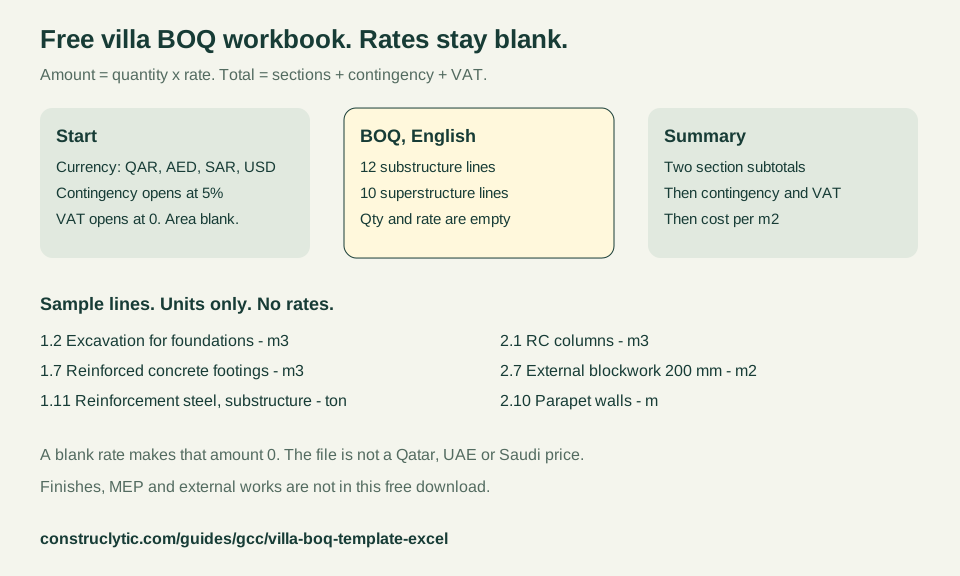
The free villa BOQ template is an Excel workbook for a house bill of quantities: a Start sheet, an English BOQ sheet with 22 lines in two sections (12 substructure and 10 superstructure), and a Summary sheet. Each line has an item, a description, a unit, a blank quantity, a blank rate and an amount. Amount = quantity × rate. The summary total = the sum of the section subtotals + contingency + VAT. Every rate cell is blank. The download is free and has no email gate. It is not a Qatar, UAE or Saudi price.
Three sheets, and the amount is quantity times rate
A villa BOQ template in Excel is a blank bill you fill, not a price list. This free file is villa-boq-workbook-lite.xlsx. It has three sheets: Start, BOQ and Summary. The BOQ columns are Item, Description, Unit, Qty, Rate, Amount and Notes. The Rate and Amount headings follow the currency chosen on Start. Amount = quantity × rate. Total = sum of sections + contingency + VAT. If the quantity cell or the rate cell is empty, that amount is 0, so a blank rate cannot invent a total.
Start cell B4 is a list: QAR, AED, SAR or USD. It opens on QAR. Cell B5, contingency, opens at 5%. Cell B6, VAT, opens at 0. Cell B7, built-up area in m², is empty. The note beside the VAT cell says Qatar has no VAT, UAE VAT is 5% and Saudi VAT is 15%, and it tells you to set the cell to your case. That sentence is the workbook’s own note. This page does not cite a tax statute for it. Replace 5% and 0 if your contract uses different percentages. The same Start sheet also prints short Arabic instructions. It does not translate the BOQ lines.
| Column | What you do |
|---|---|
| Item | The line address, such as 1.7 or 2.1. |
| Description | The English name of the work. Do not treat it as a full specification. |
| Unit | m², m³, ton or m, as printed on that line. |
| Qty | Pale yellow. Type the measured quantity. It ships empty. |
| Rate | Pale yellow. Type a rate from a quote. It ships empty. |
| Amount | Formula: blank quantity or blank rate gives 0, otherwise quantity × rate. |
| Notes | Empty. Use it for a drawing reference or an exclusion. |
Twenty-two lines, substructure then superstructure
The free BOQ has 22 priced lines and no others. Section 1, substructure, is items 1.1 to 1.12. Section 2, superstructure, is items 2.1 to 2.10. There is no finishes section, no mechanical and electrical section and no external-works section in this download. A subtotal row sits under each section and sums that section’s amount column. The table below is the line list. Units are copied from the file. Rates are not shown because the file does not contain any.
Use the unit as the meaning of the quantity. A square metre of anti-termite treatment is not a cubic metre of excavation, and a ton of reinforcement is not a cubic metre of concrete. Parapet walls are in metres. The descriptions are short labels, not a method of measurement and not a specification. Read how those columns work, including preliminaries, provisional sums and prime cost sums, on how to read a villa bill of quantities. This workbook has none of those three line types.
| Item | Description | Unit |
|---|---|---|
| 1.1 | Site clearance and setting out | m² |
| 1.2 | Excavation for foundations | m³ |
| 1.3 | Backfill and compaction (approved fill) | m³ |
| 1.4 | Anti-termite treatment | m² |
| 1.5 | Polythene sheet under slab | m² |
| 1.6 | Blinding concrete (lean mix) | m³ |
| 1.7 | Reinforced concrete footings | m³ |
| 1.8 | Neck columns and tie beams | m³ |
| 1.9 | Ground-floor slab on grade | m³ |
| 1.10 | Bitumen / membrane waterproofing to substructure | m² |
| 1.11 | Reinforcement steel (substructure) | ton |
| 1.12 | Blockwork below DPC (solid blocks) | m² |
| 2.1 | RC columns | m³ |
| 2.2 | RC beams | m³ |
| 2.3 | RC suspended slabs (first floor and roof) | m³ |
| 2.4 | RC staircase | m³ |
| 2.5 | Reinforcement steel (superstructure) | ton |
| 2.6 | Formwork / shuttering | m² |
| 2.7 | External blockwork 200 mm | m² |
| 2.8 | Internal blockwork 100-150 mm | m² |
| 2.9 | Roof waterproofing and thermal insulation | m² |
| 2.10 | Parapet walls | m |
How the summary adds contingency and VAT
Amount = quantity × rate. Total = sum of sections + contingency + VAT. On the Summary sheet the two section amounts are carried forward, not typed again. Their sum is the subtotal. Contingency is that subtotal multiplied by the percentage on Start. VAT is the subtotal plus contingency, multiplied by the VAT percentage on Start. The grand total is subtotal + contingency + VAT. Cost per m² of built-up area is the grand total divided by Start cell B7, and only when that area is greater than 0. If the area is still blank, the cell says to set the area on Start. It does not divide by zero and it does not assume a villa size.
With every rate left blank, every line amount is 0, both subtotals are 0, and the grand total is 0. That is the file as published. Filling a quantity without a rate still leaves that amount at 0. The 5% contingency does not create money from a blank rate. Do not type a number over an amount cell or a subtotal cell. Those cells are formulas. The Notes column is the place for a comment.
| Summary line | What the cell calculates |
|---|---|
| 1. Substructure | Subtotal of items 1.1 to 1.12 |
| 2. Superstructure | Subtotal of items 2.1 to 2.10 |
| Subtotal | Sum of the two section subtotals |
| Contingency | Subtotal × the Start contingency percentage |
| VAT | (Subtotal + contingency) × the Start VAT percentage |
| Grand total | Subtotal + contingency + VAT |
| Cost per m² | Grand total ÷ built-up area, after the area is greater than 0 |
How to use the workbook in five steps
The Start sheet already numbers five moves. They are repeated here so the download is usable without hunting through the file. None of the steps inserts a market rate.
- On Start, pick the currency in B4: QAR, AED, SAR or USD. Contingency opens at 5% and VAT at 0. Type the built-up area in m². Change the percentages to the figures in your own contract. The sheet note names Qatar, UAE and Saudi VAT as none, 5% and 15% and tells you to set the cell yourself.
- On the BOQ sheet, type quantities from the drawings into the pale yellow Qty cells. Leave Rate blank until you have a written quote for that unit.
- Leave the Amount formula in place. Amount = quantity × rate. A blank quantity or a blank rate keeps that amount at 0.
- Read Summary. It adds the substructure subtotal and the superstructure subtotal, then contingency, then VAT, then the grand total. Cost per m² appears only after the built-up area is greater than 0.
- Take rates from a supplier quote or from a dated page on this site. Do not copy a number into the rate column from memory. The places to look are named in the next section.
Where the rates belong, and where the quantities come from
This template does not print a rate. A per-square-metre benchmark is not a cell you paste into item 1.7. Where a source was opened, the comparison stays on GCC construction cost per m² 2026. A single-country villa figure, where a page was opened, stays on villa construction cost in Qatar, villa construction cost in the UAE and villa construction cost in Saudi Arabia. Dated ready-mix comparisons are concrete price per m³ in Qatar, concrete price per m³ in the UAE and concrete price per m³ in Saudi Arabia. Dated block prices are concrete block price in the UAE and concrete block price in Saudi Arabia. Dated rebar prices per ton are rebar price per ton in the UAE and rebar price per ton in Saudi Arabia. Those pages are the rates. This workbook is the blank structure you put a quoted rate into.
Quantities are a different job from rates. Excavation in bank, loose and compacted cubic metres is in villa excavation and backfill, and a strip can be measured in the trench calculator. Block counts are in blocks per square metre and the concrete block calculator. A slab volume is in the concrete slab calculator. Reinforcement mass by element is in rebar kilograms per cubic metre, which is not a tonnage for line 1.11 or 2.5 until a schedule exists. The other quantity pages are on the GCC construction guides.
A fuller workbook is not in this download
The free file stops after superstructure. Its Summary sheet says so: the lite version is substructure and superstructure only, and a fuller version adds finishes, MEP, external works and an Arabic sheet. That fuller workbook has 47 lines in five sections. The first 22 lines match this download. Finishes adds 14 lines, mechanical and electrical lump sums add 7, and external works adds 4. 22 + 14 + 7 + 4 = 47. It also has a right-to-left sheet named جدول الكميات. On that sheet the quantity and the rate are formulas that follow the English BOQ, so the yellow cells are filled once. Its Summary carries five sections, then the same contingency, VAT, grand total and cost per m² pattern. Every rate in that file is blank as well.
The fuller file is not published on this site, and this page does not state a price or a shop. Download the free workbook above. It has no email gate. When you compare two filled copies, compare the lines, not only the grand total. A file that later grows finishes or external works is a larger job than these 22 lines. The collection rules for that comparison are on how to read a villa bill of quantities.
| Section | Lines | Sample items and units |
|---|---|---|
| Finishes | 14 | Internal cement plaster, m²; floor screed, m²; internal doors, nr; kitchen cabinets and worktop, item |
| MEP (lump sums) | 7 | Electrical installation, LS; plumbing and drainage, LS; air conditioning, LS |
| External works | 4 | Boundary wall, m; interlock paving, m²; main gate, nr; landscaping, LS |
A method of measurement is not printed in the file
The workbook is an estimating layout. It is not a copy of a standard’s trade tables, and it does not name a method of measurement on the BOQ sheet. A contractor bill should name the rules it used. RICS New Rules of Measurement are a standard set of measurement rules for the cost management of construction projects, and the suite includes NRM 2: Detailed measurement for building works. The RICS page says the documents were reissued in October 2022 as practice information. The 22 lines on this sheet are not that work-section list. Two bills are comparable only when they name the same rules. The reading guide records the RICS texts that were opened for that point, including Principles of Measurement (International).
NRM 2’s own title page, in the PDF linked below, says 2nd edition, October 2021, effective 1 December 2021, reissued in October 2022 as RICS practice information. This page uses that identity and does not copy the trade measurement tables. Nothing here is a tender, a specification or professional advice. The Start sheet says the same: the template is an estimating aid, not a priced tender.
Questions people ask
What is a villa BOQ template in Excel?
The free villa BOQ template is an Excel workbook for a house bill of quantities: a Start sheet, an English BOQ sheet with 22 lines in two sections (12 substructure and 10 superstructure), and a Summary sheet. Each line has an item, a description, a unit, a blank quantity, a blank rate and an amount. Amount = quantity × rate. The summary total = the sum of the section subtotals + contingency + VAT. Every rate cell is blank. The download is free and has no email gate. It is not a Qatar, UAE or Saudi price.
What does the free villa BOQ Excel workbook contain?
Three sheets: Start, BOQ and Summary. The BOQ sheet has 22 English lines, 12 for substructure and 10 for superstructure, with columns for item, description, unit, quantity, rate, amount and notes. Quantity and rate ship blank. Amount = quantity × rate, and a blank rate makes the amount 0. There is no finishes, MEP or external-works section in the free file, and there is no Arabic BOQ sheet in it.
How do you calculate the total of a villa bill of quantities?
Amount = quantity × rate. Total = sum of sections + contingency + VAT. In this workbook the subtotal is the substructure subtotal plus the superstructure subtotal. Contingency is the subtotal times the percentage on Start, which opens at 5%. VAT is the subtotal plus contingency, times the VAT percentage, which opens at 0. The grand total adds those three. Cost per m² is the grand total divided by the built-up area only after that area is greater than 0.
Where do I get rates for a villa BOQ in Qatar, the UAE or Saudi Arabia?
Not from this template. Every rate cell is blank on purpose. Use a written supplier or contractor quote, or a dated page that names its source: the GCC construction cost per m² 2026 benchmark, the Qatar, UAE and Saudi villa cost guides, and the concrete, block and rebar price guides. A benchmark per square metre is not a rate for one BOQ line.
Is there an Arabic Excel template for a villa bill of quantities?
The free download’s BOQ sheet is English. The Start sheet includes Arabic instructions, and the Summary sheet prints an Arabic name beside each section. This Arabic web page explains the same file. A fuller workbook, not published here and not priced on this page, adds a right-to-left sheet that follows the English quantities and rates. The free file does not include that sheet.
Sources and calculation basis
Source links support the points named beside them. Worked quantities are Construclytic calculations using the assumptions shown above. A price in a table is the figure that source printed on the date it was read. It is not a quotation for your site, and it does not replace the project specification.
- RICS: New Rules of MeasurementOpened 7 November 2026 for the villa bill-reading guide, and used again here for the same sentences. The RICS page says NRM provides a standard set of measurement rules for the cost management of construction projects, and that the suite includes NRM 2: Detailed measurement for building works. It says the documents were reissued in October 2022 as practice information. This workbook is not a copy of the trade tables, and its 22 lines are not an NRM 2 work-section list.
- RICS NRM 2: Detailed measurement for building works, 2nd editionOpened 7 November 2026 for the villa bill-reading guide. PDF title page: 2nd edition, October 2021, effective 1 December 2021, reissued in October 2022 as RICS practice information. This page cites that identity only. The trade measurement tables are not copied, and the Excel file does not claim to follow NRM 2.